
Checking a structure by IR
You have a measured IR spectrum and a candidate structure. In this guide, you predict the structure’s spectrum and compare your peaks with it.
Run the calculation
Section titled “Run the calculation”- Open a project and click New job in this project.
- Enter the candidate structure: type a SMILES string, read a structure file (XYZ, MOL, SDF or PDB), or click Draw it to sketch it.
- Keep the task Optimisation then frequencies. Frequencies are meaningful only at an energy minimum, so the job optimises the structure first.
- Choose a target and click Submit, then wait for the green Finished badge.
- On the Summary tab, check that Stationary point reads A minimum.
Compare with your spectrum
Section titled “Compare with your spectrum”-
Click the IR spectrum tab.
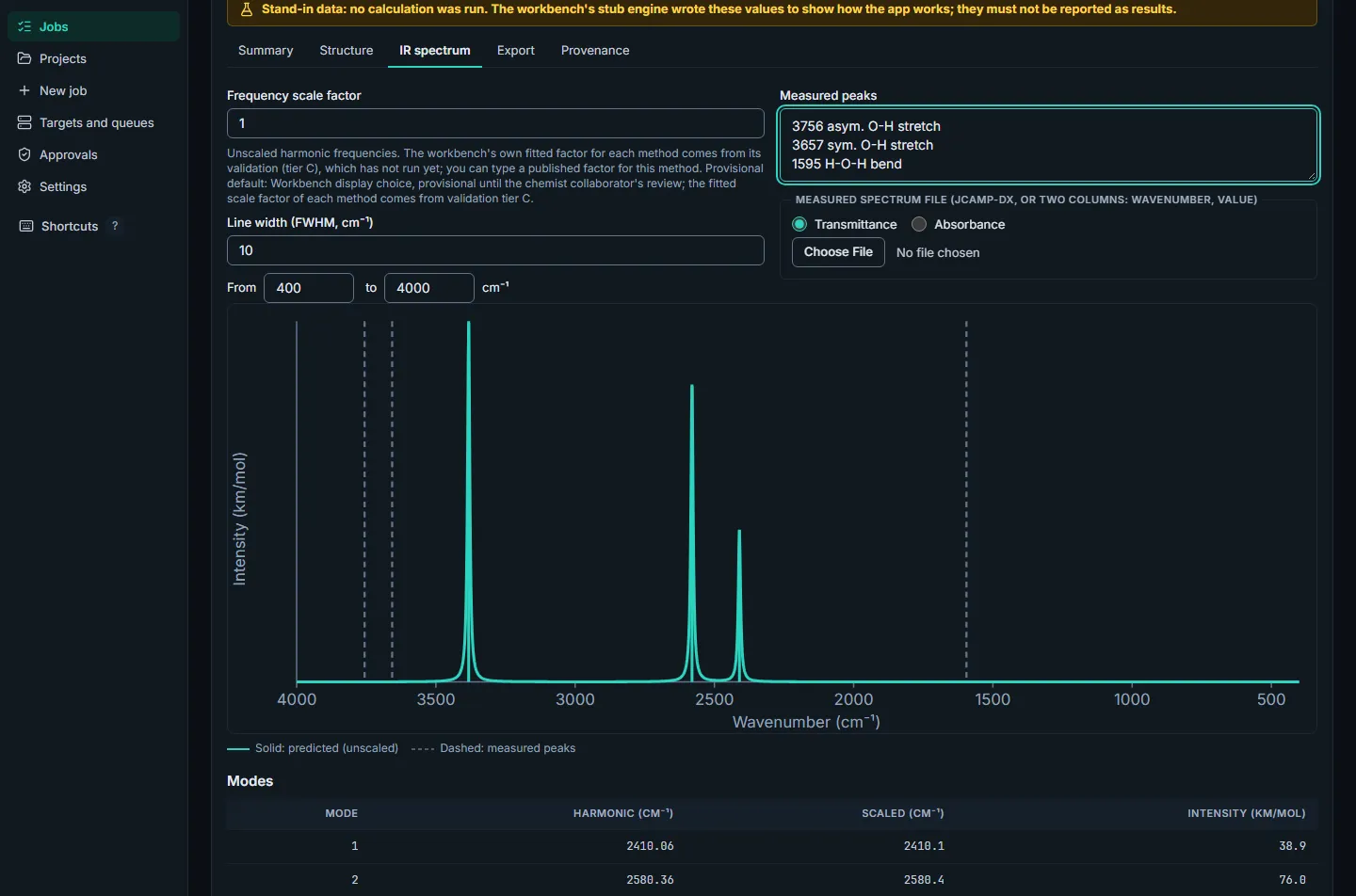
The tab shows the predicted spectrum, the line width (10 cm⁻¹ by default), the range (400 to 4000 cm⁻¹) and a table of modes with their intensities.
-
Type your measured peaks into Measured peaks, one per line, with an optional label:
3756 asym. O-H stretch3657 sym. O-H stretch1595 H-O-H bendOr load your spectrum with Measured spectrum file (JCAMP-DX or a two-column text file).
-
Read the plot. Your peaks appear as dashed lines over the predicted spectrum, and a table pairs each peak with the predicted mode nearest to it in wavenumber. The pairing helps you read the plot, and you still assign the bands yourself.
Scale the frequencies
Section titled “Scale the frequencies”Computed harmonic frequencies are usually higher than measured fundamental frequencies, so they are often multiplied by a scale factor below 1. The Frequency scale factor is 1 by default, so the tab shows unscaled values until you type a published factor for your method. The validation suite fits the workbench’s own scale factors, and they will appear here after the project publishes that run.
Save what you need
Section titled “Save what you need”- Download the frequencies (CSV) and Download the frequencies (JCAMP-DX) save the predicted spectrum.
- The workbench does not yet save measured peaks with the result, so keep your own copy of the list.
An open-source project on GitHub. Built by Graham Morley.