
//_01
Researchers with cluster access
If your university gives you time on a Slurm cluster, you can run jobs on it from a visual dashboard without writing batch scripts.
Remote workstations and clustersDraw or paste a molecule, choose a method, and run the calculation on your own computer or your university's supercomputer. On a cluster, Quachem writes and submits the job script for the Slurm scheduler, shows the login prompts in its own window and copies the files back and forth. It explains each result in plain language and saves your research in folders on your own computer.
If you are a chemist, you can help us check the chemistry.
Who it is for
Quachem runs on your own computer, a lab workstation or your university's cluster, and saves every result as files on your computer. Nothing goes to a cloud service except an optional PubChem name lookup.
//_01
If your university gives you time on a Slurm cluster, you can run jobs on it from a visual dashboard without writing batch scripts.
Remote workstations and clusters//_02
Quachem saves your structures and results on hardware you control, so you don't have to send new compounds to a third-party service.
How your research is saved//_03
You can draw a molecule in the 2D sketcher, check it against your measured IR spectrum, or let an AI agent submit jobs through qcw that wait for your approval.
| Where jobs run | Your computer, a lab workstation over SSH, or your university's Slurm cluster |
|---|---|
| Where results are saved | Readable files in a folder on your computer |
| Price | Free, with no accounts or usage limits |
| Licence | Open source under Apache 2.0 |
| Calculations today | Geometry optimisations, frequencies, IR spectra and isomer energies |
| Planned for 1.0 | UV-Vis spectra, NMR shifts and transition-state searches (roadmap) |
Version 0.1.0 is an early preview, released in November 2026, and more calculations are on the way.
The app
When you open a finished job, the page shows its summary, structure, IR spectrum, exports and provenance on separate tabs. The provenance is the record of every setting the job used and where each value came from. In this example, three measured bands of water are drawn as dashed lines over the predicted spectrum.
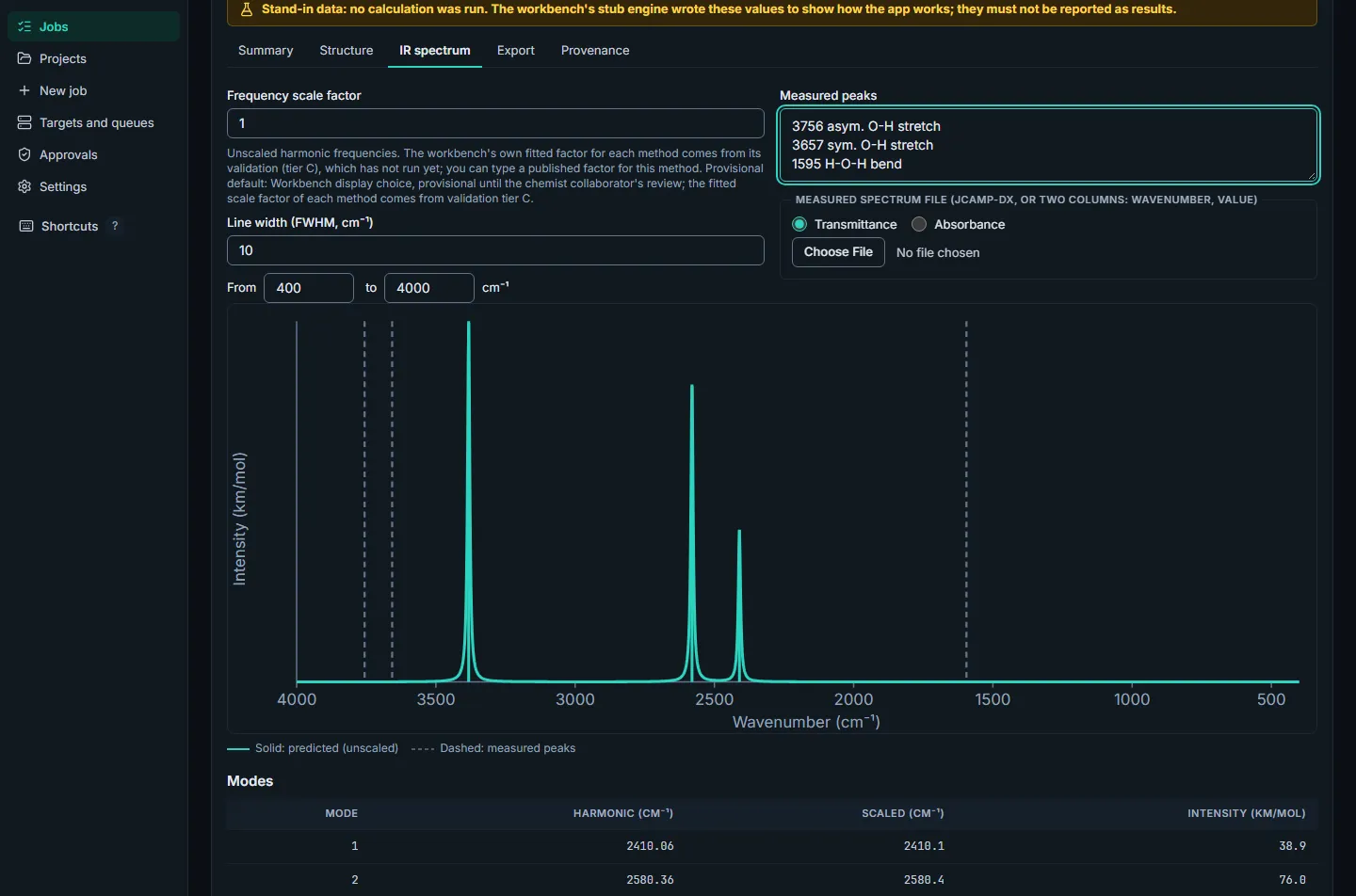
This screenshot comes from the workbench's demo service, which fills in placeholder values without running a calculation. The app labels every demo result as placeholder data.
How it works
//_01
Use a SMILES string, a structure file, a PubChem name or the sketcher.
//_02
Keep the default method or pick another, then choose whether the job runs on your computer, a workstation or a cluster.
//_03
Follow the optimisation step by step, then read the summary, the spectrum and the methods paragraph.
01 · Easy to use
You can draw, paste or look up a molecule, pick a method whose caveats are explained in plain language, and get answers to the questions that come up at the bench. Quachem is designed for molecules of up to a few dozen atoms. UV-Vis spectra, NMR shifts and transition-state searches are planned for version 1.0, and molecular dynamics, docking and protein calculations come after it, as the roadmap describes.
//_01
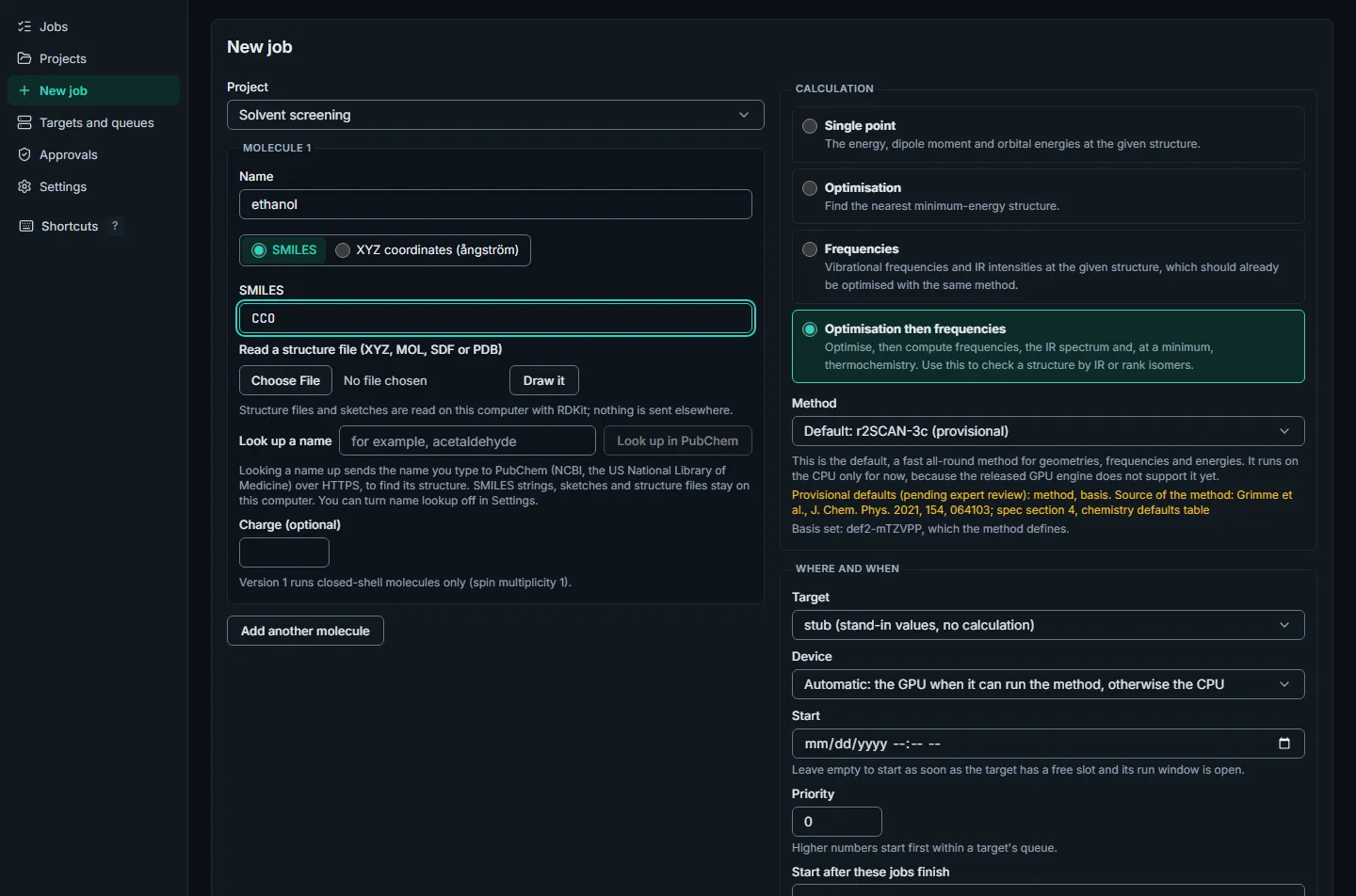
Type a SMILES string, read an XYZ, MOL, SDF or PDB file, look a name up in PubChem, or draw the molecule in the 2D sketcher. The RDKit library builds the 3D structure on your computer. A PubChem lookup is the only step that sends anything off your computer, so the form shows a notice beside it, and you can turn lookup off in the settings.
In the 3D editor, which is built on three.js, you can set bond lengths, angles and dihedral angles to exact values, attach fragments, find a structure's point group and symmetrise it. You can also type every edit as a command. In version 0.1.0 you can run the editor's commands with qcw edit, and the usability pass in progress plans to open the browser editor inside the app.
//_02
The form describes each method in a sentence that a non-specialist can follow. It also marks the default method as provisional, which means a chemist collaborator has not yet reviewed that choice.
Methods offered
//_03
Compare the predicted IR spectrum with what your instrument measured. On the IR spectrum tab, you can type your measured peaks or load a JCAMP-DX file, set a scale factor and line width, and download the spectrum as CSV or JCAMP-DX.
Measured peaks, one per line
3756  asym. O-H stretch
3657  sym. O-H stretch
1595  H-O-H bend
The tab pairs each measured peak with the nearest predicted mode to help you read the spectrum.
//_04
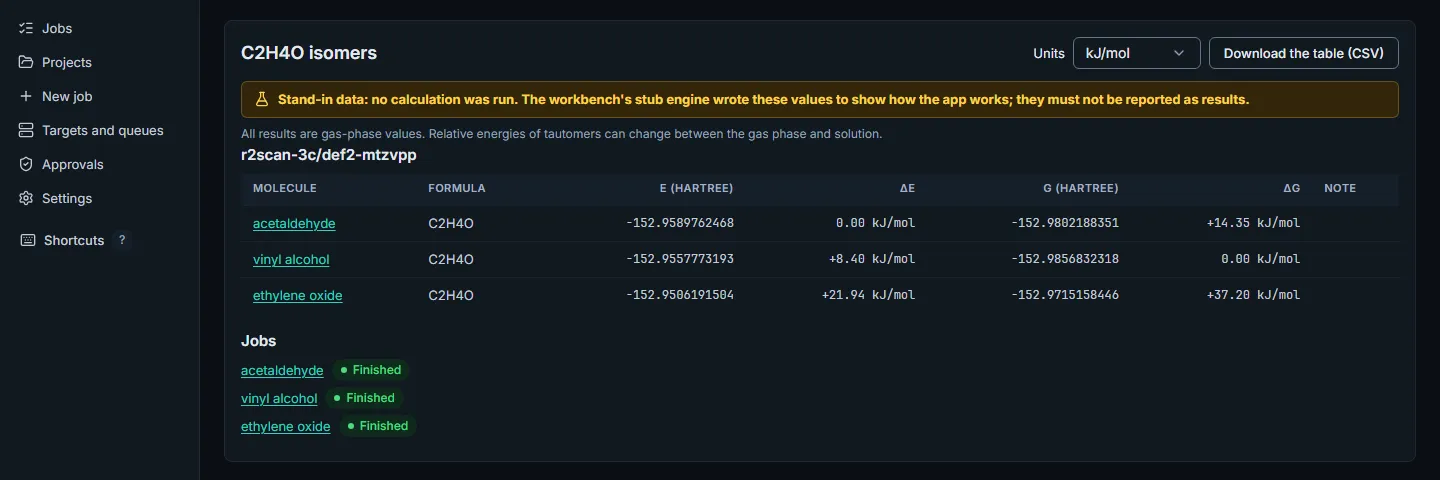
When you submit several molecules together, they form a job set. The set's page compares their electronic and Gibbs energies in kJ/mol, kcal/mol or eV, relative to the lowest-energy structure. The table names the method and basis set, because energies are comparable only when they come from the same method and basis set.
//_05
An optimisation-then-frequencies job checks that the optimised structure is a minimum before it reports frequencies. If the structure is a saddle point, the result is marked NOT A MINIMUM.
//_06
A finished job gives the optimised geometry, the dipole moment and the orbital energies, with exports you can paste into a manuscript or a table.
//_07
The Provenance tab lists every setting a job used and the source of each value.
02 · From your laptop to the supercomputer
You use the same interface for your own computer, for a workstation that you reach over SSH and for a university cluster that uses the Slurm job scheduler. For a cluster, Quachem writes the batch script, submits it and tracks the job. Login prompts, including multi-factor codes, appear in the app window. The job keeps running if you close your laptop or lose the connection, and when you reconnect, Quachem reads the job's state and copies the results back.
//_GPU
If your computer has an NVIDIA GPU, GPU4PySCF runs the calculation on it inside the engine container, on Linux or on Windows with Docker Desktop. Otherwise, PySCF runs the calculation on the CPU.
//_SSH
Quachem runs jobs on a Linux machine that you reach over SSH, inside Docker or Apptainer containers.
//_HPC
Password, Duo and device-code sign-in prompts appear in the workbench window, and Quachem checks the queue for you.
Quachem checks a cluster's queue with one squeue per target at most every two minutes. For cluster administrators lists every command it runs on a login node.
Recorded timings, optimisation then frequencies
# one job, waited for, printed as JSON
$ qcw run water-opt-freq.toml --json
# a batch overnight, labelled as an agent's work
$ QCW_ACTOR=my-agent qcw submit isomers.toml --start-at 2026-12-01T20:00
# the guide written for agents and scripts
$ qcw guide
The command line prints JSON for scripts and AI agents to read.
If a job submitted from the command line exceeds your approval limits, it waits until you approve it in the browser. The command line cannot approve jobs.
03 · Your research stays yours
//_01
Each project is a folder of readable files, with inputs, results, provenance and raw engine output. You can export a project as one ZIP archive, which a colleague can add to their own workbench. Quachem sends nothing to a cloud service, and the only lookup that leaves your computer is the optional PubChem name search.
Files you can download
04 · Results you can defend
//_01
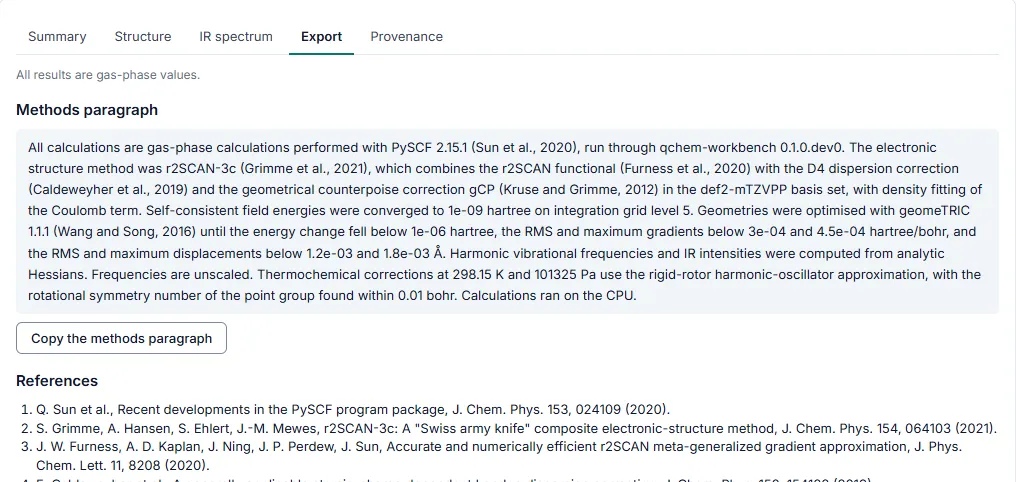
For every finished job, Quachem writes a methods paragraph that names the program versions, method, basis set, grid, convergence thresholds, optimiser and device, followed by numbered references. You can copy it with one button.
Quachem marks its default method, basis set and convergence settings as provisional until a chemist collaborator has reviewed them, and the Provenance tab records the source of each one. The project treats checking the app's accuracy as seriously as building the app. The validation suite runs every job through the workbench itself, downloads each reference file from its original source and verifies its checksum, and cites every value it compares against. The project will publish the results of the first full run here, together with the engine image digest, an exact fingerprint of the engine software, for every run. Until then, this site gives no accuracy figures.
//_01
The suite checks that the CPU and GPU engines agree on the same molecules, and that Hartree-Fock and DFT energies match reference values from the Psi4 test suite.
//_02
The suite checks that the workbench reproduces published per-reaction results from GMTKN55 (Goerigk et al., 2017) for the same functional, basis and geometry.
//_03
The suite uses six GMTKN55 subsets of isomers and conformers to measure how far each method's energy rankings fall from high-level reference values.
//_04
The suite compares scaled frequencies with the gas-phase fundamental frequencies in the NIST Shimanouchi tables (NSRDS-NBS 39), and geometries and dipole moments with NIST CCCBDB.
//_upstream
While building the GPU engine, the project's developers found that the GPU build of Libxc 7.1.2 keeps functional data in CUDA managed memory. On GPUs without concurrent managed access, which includes GPUs under WSL2, GPU DFT calculations then crash or run at about half speed. The engine includes a patch that keeps that data in host memory, and the developers reported the cause and the fix to Libxc and GPU4PySCF.
05 · Open source and free
Quachem Workbench is released under the Apache License 2.0, with no licence fees. It builds on these open-source projects:
The repository records the licence of every dependency and the reason for every decision. Bug reports, chemistry reviews and code are all welcome.
Install the workbench, and try the interface with the demo service before you build the engine. Version 0.1.0 is an early preview, and the project would like chemists to check its chemistry defaults.